How car audio works
DriveDeck uses an audio helper in its own APK, started as a Shizuku user service, to route phone audio to the car during projection. The helper is automatic; a separate audio APK or root access is not required. Playback routing and returning the car microphone are different paths.
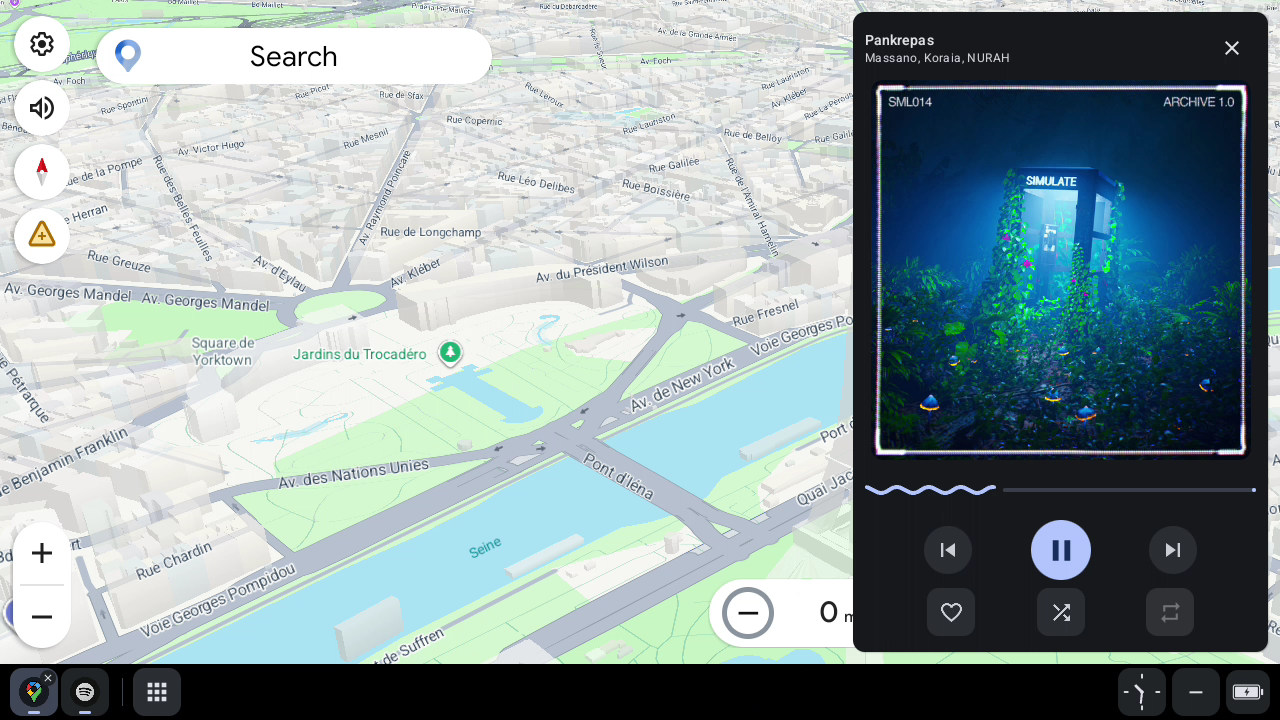
Music playing on the projected car screen. The player card in this capture is from before 2.7.
From a phone app to the car
- DriveDeck establishes a projection session and binds its authorized helper. An idle helper owns no active audio policy, recorder, focus or PCM pipe.
- The helper registers an Android audio policy and prepares separate media and navigation-guidance mixes. It uses the verified platform identity for privileged operations and associates mixes with the current Android user.
- Android routes matching playback to loopback mixes.
AudioRecordreads their PCM samples. Media can include a staged parked app where the capture policy and user identity permit it. - The helper writes framed PCM to file-descriptor pipes. DriveDeck reads the streams, observes car audio focus and sends permitted audio over the projection connection. Media and guidance have separate lifetimes.
- Session termination releases owned records, mixes, focus and pipes. If the helper or connection is lost, the route must be retired; a subsequent connection can establish a new one.
The implementation uses Android's internal audio-policy interfaces, so availability varies with Android and vendor implementations. Negotiated audio format and stream state are session-specific. Source: ShellAudioPlatform.kt and ShellAudioSession.kt.
Inside the helper-to-app pipe
The playback helper and DriveDeck are separate processes. Binder carries setup, lifecycle and focus commands; the PCM itself travels through one reliable file-descriptor pipe per active stream. A prepare request being accepted means that work was queued, not that routing has finished. The helper reports prepared and active states separately. Each route has a projection identity and generation, so late work from a retired route cannot be treated as a new route. Client death or an expired lease retires the helper's owned resources.
The current pipe format is useful when tracing the implementation:
| Part | What DriveDeck checks |
|---|---|
| Header | A 72-byte, big-endian DDPC header identifies format version 2 and the stream. |
| Ownership | Projection token, route generation and parked-app policy epoch bind a frame to its route. |
| Timing | Sequence, monotonic timestamp and timestamp origin preserve order and explain where timing came from. |
| Format | Byte count, PCM frame count, sample rate and channel count must agree with the negotiated stream. |
| Payload | PCM follows the header. An incomplete or out-of-order frame fails that route rather than being interpreted as a fresh header. |
The producer uses nonblocking pipe writes. A whole frame can be dropped before any of it is written when the reader is slow; a partially written frame cannot safely be discarded because that would corrupt framing. Repeated whole-frame stalls or a partial-frame stall cause the route to be retired. These boundaries limit backlog; they do not make an overloaded phone or connection immune to audible gaps. The exact wire layout and checks live in PcmPipe.kt and the lifecycle in ShellAudioSession.kt.
Frame layout and backpressure
For the current version-2 playback pipe, offsets are measured in bytes from the start of each header. Integers are big-endian. This is an internal protocol between matching DriveDeck processes; it is not an Android Auto wire format or a stable third-party API.
| Offset | Bytes | Field |
|---|---|---|
| 0 | 4 | Magic DDPC. |
| 4 | 2 | Version, 2. |
| 6 | 2 | Header length, 72. |
| 8 | 4 | Stream mask: media 1 or guidance 2. |
| 12 | 4 | Timestamp origin: capture monotonic 1 or read monotonic 2. |
| 16 | 8 | Projection token. |
| 24 | 8 | Route generation. |
| 32 | 8 | Delivered-frame sequence. |
| 40 | 8 | Monotonic timestamp in microseconds. |
| 48 | 4 | Payload size in bytes. |
| 52 | 4 | Number of PCM sample frames. |
| 56 | 4 | Sample rate in hertz. |
| 60 | 4 | Channel count. |
| 64 | 8 | Parked-app policy epoch; guidance uses zero. |
The payload begins at offset 72. The current format is PCM16 with one or two channels, so a
sample frame occupies channels × 2 bytes. The reader checks that the payload byte count equals
the sample-frame count times that size, and bounds a chunk to approximately 10 ms at the
negotiated sample rate. It rejects a mismatched stream, route, format, sequence or backwards
timestamp; it does not scan for another magic header after a truncated frame.
The writer uses a 250 ms deadline for a frame and polls a nonblocking descriptor for up to 10 ms at a time while it waits. If the deadline expires before any bytes are written, it drops that whole frame. The capture clock still advances, but the delivered sequence advances only after a complete write, so a dropped block does not create a sequence-number hole. Four consecutive whole-frame drops retire the route; a stalled partial frame retires it immediately. These are failure boundaries, not a guarantee of 250 ms latency or uninterrupted sound. See AudioRoute.kt and ProjectedAudioProtocol.kt for the current limits.
Focus, pressure and capture policy
The car's focus requests and Android playback focus determine when media or guidance may be sent. A navigation prompt can temporarily affect media without making the player start a new track. Pipe buffering and bounded queues help decouple capture from transport; under load, audio can still underrun or crackle. A temporary startup delay is not by itself proof of a permanent capture failure.
Apps can restrict playback capture. DriveDeck checks current playback policy for staged guest audio and does not treat missing policy metadata as permission. Protected content, calls, an OEM audio implementation or a failed helper can therefore affect what is heard. See parked-app troubleshooting for practical checks.
What to check when there is no sound
Check that Shizuku is running and DriveDeck is authorized, the car is connected, the source app is playing, and the car volume is up. Try a supported ordinary media app to distinguish a source-specific restriction from a connection problem. If only a parked app is silent, that app's capture policy may be relevant. Disconnect and reconnect after resolving a stopped helper; avoid repeatedly changing unrelated phone settings.
Collect a focused diagnostic
With a computer authorized for the intended device, select its serial explicitly. Start this capture before reproducing the problem, then stop it with Ctrl+C. It reads logs; it does not clear them or change audio settings.
adb devices -l
adb -s SERIAL logcat -v threadtime -s DriveDeck:I DriveDeckAudioHelper:I DriveDeckCarMic:I
A log can contain app names and device or connection details. Review it before sharing. A helper startup message alone does not prove the car received audio: compare connection, route activation, source playback and car focus in the same attempt. For microphone-specific checks, use the microphone return guide.